From slide to result
Run one Aurora prediction and open a spatial molecular view of your tissue. You need a prepared slide archive and programmatic access.
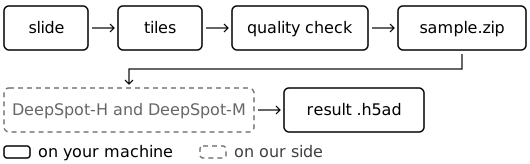
-
Prepare the tissue. Cut and check the slide on your machine with the preparation guide.
-
Run the prediction. Send the prepared archive to Aurora using the Python example below.
-
Explore the result. Open predicted expression in Aurora Intelligence or download it for your own analysis.
Submit your prepared sample
Your primary input is prepared slide tiles or locally computed tissue
representations. The API calls this input the observation. Optional sample information,
such as matched bulk RNA, is submitted as covariates.
Not executed — needs your sample and API access
This example submits a prediction and uses your account's quota.
from auroraomics.client import Client

client = Client()
card = next(m for m in client.models() if "patches" in m["accepts"]["observations"])
job = client.predict(
    model=card["id"],
    observation="sample.zip",                   # the file you prepared
    kind="patches",                             # the kind of file it is
)
adata = job.wait().download("prediction.h5ad")
print(adata.var.loc[:, ["feature_name", "measured_in_training"]].head())
The client uploads your file, waits for prediction and downloads the result. To use the workflow that keeps original images local, follow Your slides stay with you.
Open your molecular view
Use land_in_workspace=True in the predict call to offer the result to your
Aurora Intelligence inbox. Import it into a workspace to explore genes and
regions on the slide. What you get back explains how to read it.
For a cohort, submit one job per sample. Keep downloaded results for your records; Privacy and retention explains storage and expiry.
Build on this workflow
Add sample-matched bulk RNA, or use the integration guide for HTTP and agent tools.